Ua li cas nrhiav cov playlist uas muaj ib zaj nkauj hauv Android
Tso zaj nkauj hauv AT Player, nias kab player kom qhib player thiab nias Cov playlist uas muaj zaj nkauj no nyob hauv qab sab xis ntawm video. Ib daim npe ntawm cov playlist YouTube uas nrhiav tau raws li tus hu nkauj thiab lub npe ntawm zaj nkauj yuav qhib. Qhib ib qho thiab nias lub cim ntxiv ntawm nws daim duab npog kom khaws ib qho theej cia hauv koj lub tab Cov Playlist.
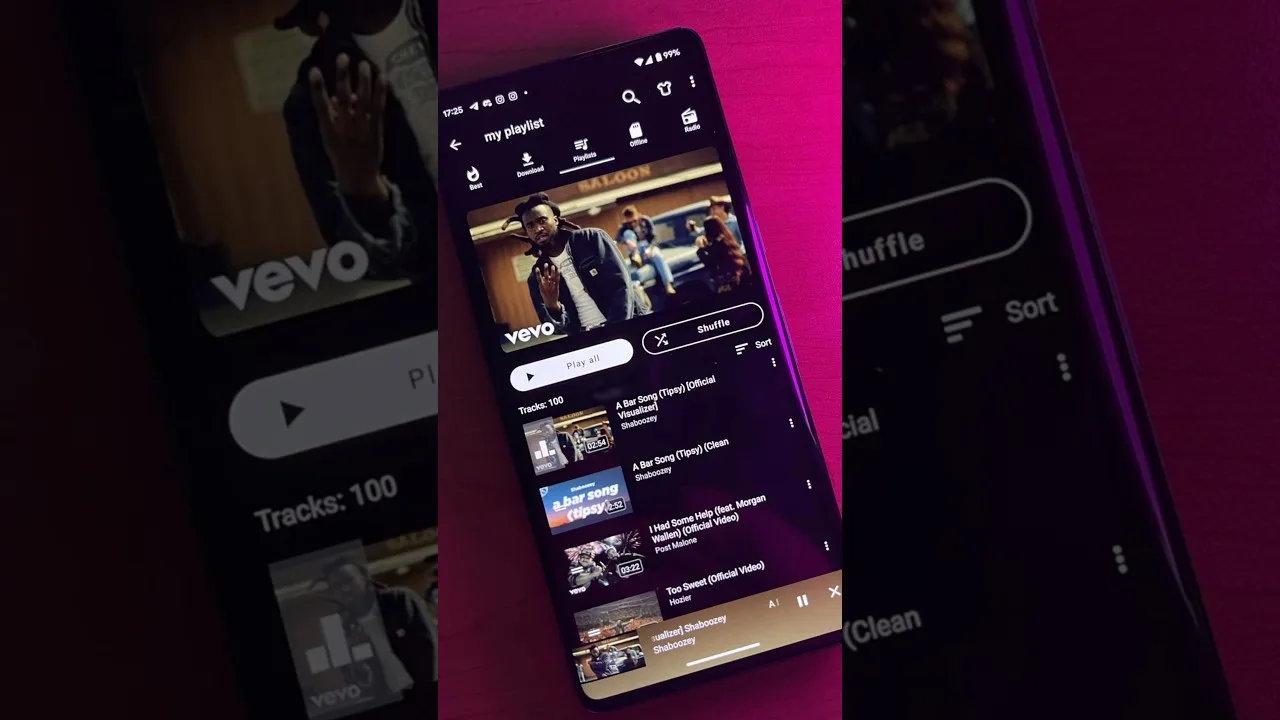
Nrhiav cov playlist rau zaj nkauj uas tab tom tso
- Tso zaj nkauj, piv txwv los ntawm kev nrhiav.
- Nias kab player nyob saum cov tab kom qhib player.
- Nias Cov playlist uas muaj zaj nkauj no, lub pob qis tshaj plaws nyob hauv qab sab xis ntawm video.
- Player yuav quav los ua kab thiab cov playlist tshwm tuaj. Nias ib qho kom pom nws cov nkauj.
- Nias Tso tag nrho, Tso Ntsuag lossis ib zaj nkauj twg hauv nws.
Lub pob nyob saum nws, Zoo Sib Xws, muab Cov Nkauj Zoo Sib Xws thiab Kev Nrhiav Khawv Koob rau tej zaj nkauj ib leeg. Yav tas los qhov feature no hu ua Playlist Radar.
Nrhiav cov playlist rau txhua zaj nkauj
Zaj nkauj tsis tas yuav tso ua ntej.
- Nias lub cim nrhiav nyob saum toj.
- Ntaus tus hu nkauj thiab lub npe zaj nkauj thiab nrhiav.
- Nias Cov Playlist hauv kab pob saum cov txiaj ntsig nrhiav.
Nrhiav cov playlist zoo li ib qho ntawm koj li
- Qhib lub tab Cov Playlist.
- Nias peb lub teev nyob ib sab ntawm ib qho ntawm koj cov playlist.
- Nias Nrhiav cov playlist zoo sib xws.
App nrhiav siv ob peb zaj nkauj los ntawm playlist ntawd, yog li sim zaum ob tej zaum yuav tau lwm cov txiaj ntsig.
Khaws ib qho playlist uas koj nrhiav tau
- Qhib playlist ntawm cov txiaj ntsig nrhiav.
- Txav mus txog qhov kawg. Playlist ntev yuav rub los thaum koj txav, thiab qhov theej tsuas muab cov nkauj uas rub los lawm.
- Nias lub cim ntxiv nyob hauv qab sab xis ntawm daim duab npog playlist. Peb lub teev nyob saum toj sab xis, ces Ntxiv rau playlist, kuj ua tau tib yam.
- Nias Playlist tshiab, ntaus ib lub npe thiab nias OK. Lossis nias ib qho ntawm koj cov playlist kom ntxiv cov nkauj rau nws.
App hais tias Ntxiv rau nrog lub npe, thiab playlist tos koj hauv lub tab Cov Playlist. Rau ib zaj nkauj xwb, nias peb lub teev ntawm nws kab thiab Ntxiv rau playlist.
Qhov theej yog koj ib qho playlist ib txwm. Nws khaws cov nkauj uas nws muaj thaum koj khaws nws, tej kev hloov tom qab rau qhov qub yuav tsis cuam tshuam nws.
Yam nws tsis ua
- Lub pob tsuas tshwm thaum ib zaj nkauj los ntawm YouTube tab tom tso. Cov nkauj los ntawm lub tab Rub Tawm, cov file hauv xov tooj thiab cov chaw xov tooj cua tsis muaj nws.
- Cov playlist nrhiav tau yog cov playlist YouTube. Lawv cov nkauj tso ncaj qha hauv internet thiab yeej tsis raug rub tawm li, thiab YouTube tsis tso thaum lub npo tua lossis thaum app khiav tom qab.
- Suab paj nruag rau mloog thaum tsis muaj internet los ntawm lub tab Rub Tawm, saib yuav rub suab paj nruag tawm mloog thaum tsis muaj internet li cas.
- Nws tsis nqa cov playlist ntawm koj tus kheej account YouTube los, nqa cov playlist YouTube los ua qhov ntawd.
Cov Lus Nug
Vim li cas kuv tsis pom Cov playlist uas muaj zaj nkauj no?
Nws tsuas tshwm thaum ib zaj nkauj YouTube tab tom tso, thiab nws zais thaum ib daim npav tshaj tawm npog video. Cov nkauj rub tawm lawm, cov file hauv xov tooj thiab xov tooj cua tsis muaj nws.
Nws puas siv tau rau ib zaj nkauj hauv xov tooj cua?
Nias Saib video hauv YouTube hauv player thaum lub chaw xov tooj cua qhia lub npe zaj nkauj, ces tso zaj nkauj ntawm cov txiaj ntsig nrhiav. Lub pob yuav tshwm thaum nws video pib tso.
Kuv puas mloog tau ib qho playlist nrhiav tau thaum tsis muaj internet?
Tsis tau, nws cov nkauj tso ncaj qha los ntawm YouTube thiab yeej tsis raug rub tawm li. Cov nkauj los ntawm lub tab Rub Tawm tso tau thaum tsis muaj internet.
Kuv daim theej puas hloov thaum daim playlist qub hloov?
Tsis hloov, nws khaws cov nkauj uas nws muaj rau hnub koj khaws cia. Koj hloov tau nws lub npe thiab tshem tau cov nkauj ib yam li txhua daim playlist uas koj tsim.