AI Music Generator
How to create music in AT Player with AI Music Generator?
AT Player makes music creation easy and fun - even if you’ve never made a song before. You can generate original music in any style or even create a track inspired by a YouTube song you love.
To generate a similar song to something on YouTube:
- Play the YouTube track inside the app.
- Expand the player from the bottom.
- Tap the three dots in the corner.
- Choose “Generate similar song.”
Or to create something from scratch:
- Tap the profile icon at the top right of the screen.
- Select Generate AI Music under Tools.
- Describe your future track - include genre, mood, vibe, or any special instruments or sounds.
- You can also choose to add vocals or keep it instrumental.
Your custom track will be created in a few seconds. Once it’s ready, you’ll get a push notification, and the song will appear in the Offline tab — ready to play anytime, even without internet.
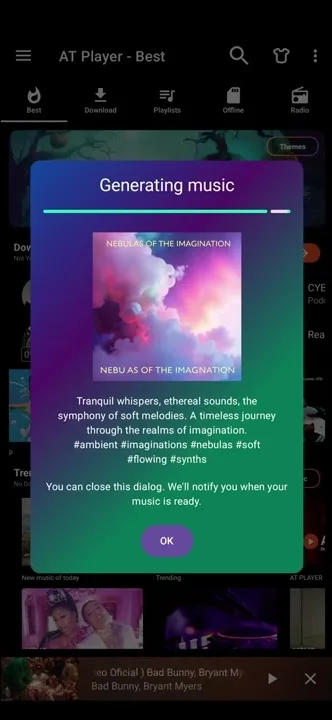
Here is an example of music which was created with AI Music Generator:

Advanced usage of AI Music Generator
Advanced Usage of AI Music Generator in AT Player
AT Player’s AI Music Generator allows you to explore endless musical possibilities with just a few prompts. You can experiment with genres, tempos, and musical styles, or leave it up to the AI to surprise you. Whether you're into classical, electronic, hip-hop, or something more experimental, you have full control over various musical parameters.
-
Control Over Musical Parameters
Shape your tracks by specifying:
Tempo (BPM): From slow 60 BPM to fast 160 BPM.
Time Signature: Choose from standard 4/4 or experiment with 3/4, 6/8, and other rhythms.
Audio Quality: High-quality settings, such as 320 kbps and 48 kHz, ensure your music sounds great. -
Mixing and Matching Genres
Feel free to blend genres or leave the genre field blank to let the AI surprise you. You might end up with exciting combinations like jazz-infused electronic beats or cinematic trap. The AI is flexible and can handle creative experiments. -
Custom Sound Effects and Vocals
Add sound effects and vocals to make your track stand out. Whether you want clean vocals, harmonies, or something electronic, the AI will incorporate your choices into the final track. -
Dynamic Instrumentation and Arrangement
You can specify instruments like piano, bass, or synths to create a rich sound. The AI can also layer elements to build depth, making your music feel dynamic and full. -
Endless Experimentation
You’re not limited by predefined genres or rigid structures. Feel free to blend unusual genres, experiment with different instruments, or leave certain prompts blank to see what the AI comes up with on its own. -
Surprises and Creativity
If you leave some prompts empty, the AI will sometimes surprise you with a unique track. This is great for users who enjoy discovering new and unexpected musical styles. -
Coming Soon: Unlimited Free Music Generation
Right now, you can generate a limited number of tracks for free each day. However, we are working on making on-device music generation available soon, allowing unlimited track creation for free to everyone.
With AT Player’s AI Music Generator, you’re free to experiment, customize, and create unique tracks. Whether you want full control or enjoy creative surprises, the AI offers endless possibilities.
How to write a prompt?
Creating the perfect prompt for generating music in AT Player is easy and fun! Here are a few tips to help you craft a prompt that brings your musical ideas to life:
1.  Start with a genre: Think of the vibe you want—pop, jazz, hip-hop, ambient, classical, or something else. Be as specific as you like.
2.  Describe the mood or theme: What emotion or setting should your music capture? Is it upbeat, melancholy, epic, or chill? Themes like “a cozy morning” or “an energetic workout mix” can make your track more unique.
3.  Include sound effects or instruments: Want guitar riffs, piano melodies, or electronic beats? Add that to your prompt to give the AI more direction.
4.  Choose vocals or instrumental: Specify whether you want vocals or prefer an instrumental piece. This will help the AI deliver exactly what you’re looking for.
5.  Be playful and creative: There are no wrong ideas. You can request a dreamy pop song with tropical vibes or even a futuristic orchestral piece with a sci-fi twist. The sky’s the limit.
Once your song is generated, it will appear in the Offline tab, ready for you to listen, share, and add to your playlists. Each track comes with its own custom cover art, making it even more personal. With a little creativity in your prompts, AT Player’s AI Music Generator can turn your ideas into a reality.
How AT Player’s AI Music Generator Stands Out from Other AI Music Generators
AT Player’s AI Music Generator offers a unique music creation experience that sets it apart from other AI-based music generators, such as Udio and Suno. Here’s how AT Player brings something fresh and distinctive to the table:
-
Personalized, Soulful Tracks
Unlike many AI music generators, like Udio, that produce polished but generic tracks, AT Player's AI-generated music often feels like it has a soul. The AI creates tracks with real emotion—sometimes uplifting and happy, sometimes melancholic and introspective. This variety gives the music a more organic, human-like feel, as if the music has a personality of its own. -
Flexible Genre Blending and Surprises
With AT Player, you’re not restricted to predefined genres. You can specify genres or leave the genre field blank and let the AI surprise you. This can result in exciting combinations like jazz-infused electronic beats or serene folk mixed with ambient soundscapes. The AI often generates unexpected but delightful results, making each creation feel like a unique musical adventure, unlike the more rigid offerings of Suno. -
Detailed Control Over Musical Parameters
AT Player provides more technical control than many other AI music generators, allowing you to fine-tune your tracks with:
BPM (Beats Per Minute): Adjust the tempo from slow and chill to fast and energetic.
Time Signature: Use standard 4/4 time or experiment with other time signatures like 3/4 or 6/8 for more complex rhythms.
Audio Quality: Choose high-quality options like 320 kbps bitrate and 48 kHz sample rate for crystal-clear sound.
These customizable parameters let you craft your music exactly the way you envision it, offering more flexibility than tools like Udio. -
Mix of Instruments and Sound Effects
AT Player lets you choose the instruments that define your track’s sound, whether it’s the warmth of a grand piano, the thump of a bass guitar, or the futuristic vibe of synthesizers. You can also layer in sound effects to enhance your track, giving it depth and richness. This flexibility allows you to shape your music in a way that is uniquely yours, standing out from platforms like Suno. -
Cool Cover Art with Surprises
AT Player doesn’t just generate music—it also creates custom cover art for each track. The covers often include unique text and design elements that reflect the mood of your song. Sometimes, the AI surprises you with incredibly fitting and unexpected designs that elevate the overall experience of your music—something that’s missing in other tools like Udio. -
Endless Experimentation with No Strict Rules
AT Player encourages endless experimentation. You don’t have to follow any strict rules—leave some fields blank, and let the AI take creative control. The AI can surprise you with unconventional combinations of genres, instruments, or effects, resulting in a sound that feels spontaneous and original. Whether it’s ambient folk or cinematic trap, the possibilities are endless, offering more creative freedom than many competitors, including Suno. -
On-Device Music Generation Coming Soon
Right now, AT Player offers free but limited daily track generation. However, we are working on making unlimited on-device music generation available soon, allowing users to create tracks without any restrictions, anywhere and anytime—going a step further than what’s currently possible on platforms like Udio. -
Unique and Organic Sound
Unlike many other AI generators, including Suno, that produce overly polished and structured tracks, AT Player’s output often feels more organic and raw. The AI generates music that can be experimental, unexpected, or filled with emotion, offering a personalized sound that feels like it has character.
In summary, AT Player’s AI Music Generator provides a creative and technical experience like no other. Whether you want to mix genres, control technical aspects like BPM or sound quality, or just let the AI surprise you, AT Player allows for both precision and creative freedom. The result is music with personality—sometimes soulful, sometimes experimental, and always original—with cool cover art to match, standing out from both Suno and Udio.